
bicepheart · Photo to Heart Video
A Little Flex. A Lot of Love. Your Photo.
Turn a favorite portrait into a playful flex-and-heart clip. Your arms make the heart, your face makes it personal — no camera setup, gym session, or editing timeline needed.
- 1 photo
- One photo, a personal heart
- 7 seconds
- Flex, heart, and smile
- 9:16 vertical
- TikTok, Reels, Shorts
- No original audio
- AI-generated audio may vary
Create Your bicepheart Video
Upload one clear portrait to turn your photo into a personal flex-and-heart video.
Aspect ratio
9:16
Fixed vertical format · TikTok / Reels
Video quality
720P
HD output
Once your video is ready, we'll email the video link to the address you use to sign in. Please check your inbox; if you don't see it, check your spam or junk folder.
Sign in to Generate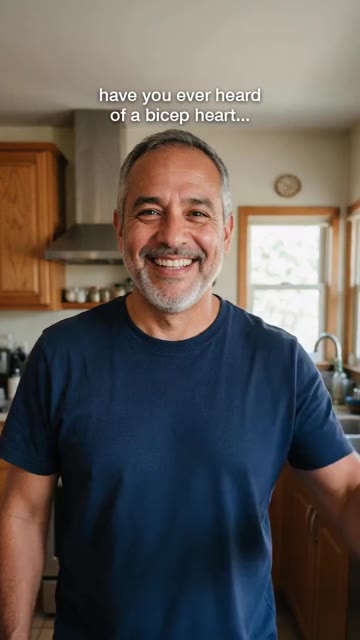
bicepheart example
An Everyday Photo. A Warmhearted Hello.
The idea is simple: face the camera, lift your arms into a gentle flex, then bring them together into a heart. A familiar expression makes the gesture feel personal. This sample shows the mood — your video is generated from your own portrait and may differ in movement, likeness, or setting. Hold the heart, then finish with a smile.
- 01A relaxed look toward the camera
- 02Both arms rise into a playful flex
- 03Bent arms meet in a heart shape
- 04Hold the heart and share a smile
Step-by-step tutorial
Make Your First bicepheart Video
- 01
Pick your photo
Choose one clear photo of an adult with their face visible. Upload only a photo you have permission to animate.
- 02
Upload and confirm
Upload your photo in the maker on this page and confirm you have permission to use it.
- 03
Set up the scene
Your video is a 7-second, 720p flex-and-heart clip in a fixed vertical 9:16 format.
- 04
Generate your video
Sign in, check the displayed credit cost, and submit. Your preview panel updates as the AI processes the video.
- 05
Share responsibly
Download your result within 48 hours. Add audio in your social app and disclose AI-generated media when required.
The trend
The Arm Heart, With a Little More Personality
A bicep heart combines a flex with an affectionate arm gesture: bend both arms, bring them together into a heart, and hold the pose. It is playful rather than athletic — a way to send a little love without taking yourself too seriously.
bicepheart helps you explore that idea from a single portrait. The AI animates the gesture while using your photo as an identity reference. Create a personal greeting, then add a caption that makes it yours.
An AI interpretation of the arm-heart gesture — not an official platform effect
Five Ways to Make the Gesture Your Own
01 / A LITTLE LOVE
For someone special
Turn a favorite portrait into a playful note for your partner. Pair it with a caption that sounds like you.
A personal greeting
02 / GOOD ENERGY
For your friends
Send encouragement before a big day, or a quick thank-you after someone shows up for you.
A friendly check-in
03 / YOUR COMMUNITY
For the people who follow you
Celebrate a small milestone with an arm heart instead of another standard selfie.
A community thank-you
04 / KEEP IT SIMPLE
For an everyday moment
You do not need a gym backdrop or big muscles. Clear framing and a relaxed expression are a better place to start.
A low-pressure idea
05 / MAKE IT YOURS
For a new kind of hello
Add your own words and permitted audio after downloading. Keep the message personal and the AI disclosure clear.
Your own creative touch
Creative ideas, not a ranking or a promise of views.
A greeting for your kind of people
One Heart. Plenty of Ways to Share It.
Solo: one photo
A single adult portrait becomes a solo flex-and-heart moment. Let the expression do the talking.
Send it to a friend
Turn your single portrait into a warm greeting, then share the finished video with a friend. No extra photo needed.
Send a thoughtful hello
Make a birthday greeting, a thank-you, or a little encouragement. A short personal caption adds meaning.
By hand or in one click
Film It Yourself, or Start With a Photo
The manual way
- Set up a camera with enough room for both arms
- Practice the flex-to-heart move and record a few takes
- Trim the best take and add music you are allowed to use
The one-click way
- Upload one clear adult portrait
- Confirm permission and generate the arm-heart animation
- Your video is automatically set to vertical 9:16
- Download the result within 48 hours and share responsibly
The generator uses your photo for identity and a reference for the flex-and-heart movement. It does not guarantee an exact likeness or reproduce every frame of a sample. Choose the approach that fits your idea, and label AI output when you share it.
See the gesture in motion
bicepheart Video Inspiration
How it works
From Portrait to a Personal Heart
Bring a clear photo and a little personality. The AI animates the arm-heart gesture while working to keep your likeness recognizable.
Upload yourself
Start with a clear adult portrait. Your photo guides the face and look of your flex-and-heart video.
Made for vertical sharing
Every video uses a fixed vertical 9:16 format. Your single portrait is all you need to get started.
Create your bicepheart clip
A 7-second MP4 of the flex, the heart, and a smile. Add your own licensed sound when you share.
Photo guide
Photo Tips for a Natural Arm Heart
- One sharp photo per person, only that person in it
- Face clearly visible — it matters most
- An upper-body photo gives the arms room to move
- Simple clothing and an uncluttered background work best
- Start with a real adult portrait, not a pet or illustration
- No photos of minors
- No group photos for the primary portrait
- No images used without consent
- Avoid sunglasses, masks, or heavily cropped faces
Good portrait input
Hard-to-process photo
Creator toolkit
The Creative Direction Behind Your Heart
Create an original, natural-looking video of the adult in the uploaded portrait. Show a relaxed smile, a gentle double-biceps flex, then bring both bent arms together to form a heart and hold it toward the camera. Preserve facial identity and natural proportions. Avoid face swaps, extra fingers, logos, and borrowed music.
Your portrait, your expression
Your photo guides facial identity and appearance.
One portrait, one personal greeting
Keep the focus on the person in your uploaded photo.
Clear framing, gentle motion
Soft light and room for the arm-heart gesture.
Pay per video
Pick a Pack for Your Heart Moments
One-time credit packs. Check the generator for the current credit cost before submitting.
1 Video
$6.99one-time
$6.99 per video
- 1 video credits
- 720p MP4 output
- One-time purchase
3 Videos
$13.99one-time
$4.66 per video
- 3 video credits
- 720p MP4 output
- One-time purchase
10 Videos
$34.98one-time
$3.50 per video
- 10 video credits
- 720p MP4 output
- One-time purchase
FAQ
bicepheart: FAQ
Who Will You Send a Heart To?
Pick a photo and turn a small flex into a personal message. Make a bicepheart clip for someone who makes you smile.
Create My Heart VideoAI content notice. bicepheart creates synthetic entertainment from portraits you are allowed to use. It is not affiliated with social platforms or the people who popularized the gesture. Everyone in an uploaded photo must be an adult, must not be a public figure, and must have agreed to the use of their image. Do not impersonate others or present generated clips as real footage. Inspiration videos are reference examples; likeness, anatomy, motion, and results will vary. No licensed trend music is included.
Download your completed video within 48 hours. If delivery email is configured, check your registered inbox and spam folder for the link.